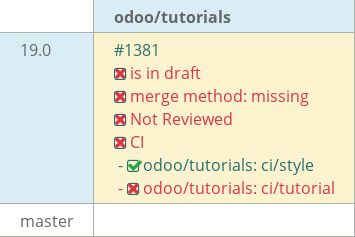
19.0 Tutorials YACHA - #1381
Conversation


Create the initial Real Estate module for the Server Framework 101 tutorial.

This introduces the base module structure with the manifest and package initialization files required for further development.
Implemented Chapter 5 of the Odoo Server Framework tutorial.

- Added window action for estate.property
- Split XML into estate_property_views.xml and estate_menus.xml
- Added three-level menu hierarchy
- Added readonly and copy attributes
- Added default values for bedrooms and availability date
- Added reserved fields active and state
Introduce explicit list and form views for the estate.property model.

The autogenerated views are sufficient for basic testing but do not
provide a structured user interface. Adding custom XML views prepares
the module for subsequent tutorial chapters, where the form and list
views will be extended with notebooks, search views, widgets, and
additional UI customizations.
Add the active field to support record archiving.
Help users find properties more efficiently by providing
search shortcuts, a quick filter for available properties,
and the ability to group records by postcode.

This makes day-to-day property management faster as users
can locate relevant records without manually browsing
through the entire list.
Add the ability to classify properties by their type and keep
track of the buyer and the responsible salesperson. This makes
property records more complete, easier to manage, and prepares
the system for the complete property sales process.
Introduce property tags to classify and organize estate records
using many-to-many relationships. This improves property
categorization, enables flexible tagging of listings, and lays
the foundation for advanced search, filtering, and future
business features.
Introduce a dedicated Property Offer model to record offers
submitted by potential buyers for properties. Each offer stores
the offered price, buyer, and current offer status, and is
linked to a single property through relational fields. Display
all related offers within the property form, enabling multiple
offers to be managed from one place and preparing the estate
module for the complete property selling workflow.

|
|

 mash-odoo
left a comment
mash-odoo
left a comment
mash-odoo
left a comment
There was a problem hiding this comment.
Hello,
Good start on the task.
I have added some comments and suggestions.
Some points to be looked at:
- Add chapter name while pushing the commits in order to understand the changes done for that particular commit.
- Update the PR title and description according to the guidelines.
- Reformat the necessary files.
| from odoo import api, models, fields | ||
| from dateutil.relativedelta import relativedelta |
There was a problem hiding this comment.
You can refer to this for ordering your imports.
| @api.model | ||
| def _default_date_availability(self): | ||
| return fields.Date.today() + relativedelta(months=3) |
There was a problem hiding this comment.
This should be placed inside the class.
You can follow this for ordering your fields, functions, constraints etc. You can check the attribute order followed in a model.
| garden_orientation = fields.Selection( | ||
| [ | ||
| ("north", "North"), | ||
| ("south", "South"), | ||
| ("east", "East"), | ||
| ("west", "West"), | ||
| ] | ||
| ) |
There was a problem hiding this comment.
| garden_orientation = fields.Selection( | |
| [ | |
| ("north", "North"), | |
| ("south", "South"), | |
| ("east", "East"), | |
| ("west", "West"), | |
| ] | |
| ) | |
| garden_orientation = fields.Selection( | |
| [ | |
| ('north', "North"), | |
| ('south', "South"), | |
| ('east', "East"), | |
| ('west', "West"), | |
| ] | |
| ) |
Try to keep the key i.e the technical strings in single quotes and the values which are to be displayed to the user in double quotes
| property_type_id = fields.Many2one("estate.property.type", string="Property Type") | ||
|
|
||
| buyer_id = fields.Many2one("res.partner", string="Buyer", copy=False) | ||
|
|
||
| salesperson_id = fields.Many2one( | ||
| "res.users", string="Salesperson", default=lambda self: self.env.user | ||
| ) |
There was a problem hiding this comment.
| property_type_id = fields.Many2one("estate.property.type", string="Property Type") | |
| buyer_id = fields.Many2one("res.partner", string="Buyer", copy=False) | |
| salesperson_id = fields.Many2one( | |
| "res.users", string="Salesperson", default=lambda self: self.env.user | |
| ) | |
| property_type_id = fields.Many2one("estate.property.type", string="Property Type") | |
| buyer_id = fields.Many2one("res.partner", string="Buyer", copy=False) | |
| salesperson_id = fields.Many2one( | |
| "res.users", string="Salesperson", default=lambda self: self.env.user | |
| ) |
Do not leave unnecessary lines between the field declarations.
|
|
||
| property_type_id = fields.Many2one("estate.property.type", string="Property Type") | ||
|
|
||
| buyer_id = fields.Many2one("res.partner", string="Buyer", copy=False) |
There was a problem hiding this comment.
What if you do not write the string here?
There was a problem hiding this comment.
Odoo automatically derives the string name explicitly from the variable name. So if we don't give this string then also it is deriving string to Property Type. I tested it. So i think i should remove it.
| ) | ||
|
|
||
| partner_id = fields.Many2one("res.partner", required=True) | ||
| property_id = fields.Many2one("estate.property", required=True) |
There was a problem hiding this comment.
What is the difference between setting a field as required=True in the model and required="1" in the XML view?
There was a problem hiding this comment.
required=True makes the field mandatory at the model level, so it applies whenever the field is used. required="1" in the XML only makes the field mandatory in that specific view.
| <menuitem | ||
| id="estate_menu_root" | ||
| name="Real Estate"> | ||
|
|
||
| <menuitem | ||
| id="estate_advertisements_menu" | ||
| name="Advertisements"> | ||
|
|
||
| <menuitem | ||
| id="estate_property_menu_action" | ||
| action="estate_property_action"/> | ||
|
|
||
| </menuitem> |
There was a problem hiding this comment.
| <menuitem | |
| id="estate_menu_root" | |
| name="Real Estate"> | |
| <menuitem | |
| id="estate_advertisements_menu" | |
| name="Advertisements"> | |
| <menuitem | |
| id="estate_property_menu_action" | |
| action="estate_property_action"/> | |
| </menuitem> | |
| <menuitem | |
| id="estate_menu_root" | |
| name="Real Estate" | |
| > | |
| <menuitem | |
| id="estate_advertisements_menu" | |
| name="Advertisements" | |
| > | |
| <menuitem | |
| id="estate_property_menu_action" | |
| action="estate_property_action" | |
| /> | |
| </menuitem> |
Re-format this file a bit.
| @@ -0,0 +1,12 @@ | |||
| <?xml version="1.0" encoding="utf-8"?> | |||
There was a problem hiding this comment.
It's the XML declaration that identifies the file as an XML 1.0 document. It's the standard way to start an XML file.
If we don't write it still ODOO parses the XML files and shows no errors
But we still explicitly define the version of that xml file.
|
|
||
| <group> | ||
| <field name="property_type_id"/> | ||
| <field name="tag_ids" widget="many2many_tags"/> |
There was a problem hiding this comment.
We use a widget when we want to change the default way a field is displayed or interacted with in the view. It allows us to provide a more suitable UI for that particular field.
| { | ||
| "name": "Real Estate", | ||
| "version": "1.0", | ||
| "author": "yacha", |
There was a problem hiding this comment.
When you are working for a company, you should keep the author name as Odoo S.A. or just skip writing it.
 yacha-odoo
changed the title
yacha-odoo
changed the title
3 participants


This PR contains the implementation of the Real Estate module from the Odoo development tutorial.
It covers:
estatemodule and its models